PUI
| Caution The feature documented below, in its current form, is currently being scheduled/expected (or discussed) to be significantly updated, or phased out, in future FlightGear versions 2024.2+ (rough estimate). This should be taken into account if you're interested in working on the feature or developing it further. If in doubt, please get in touch via the devel list first.
(Plib/PUI is to be removed and replaced by a Canvas/Nasal based solution to help improve compatibility with OSG 3.6+ and OpenGL 4.x (OpenGL Core Profile, see 2022.X Release plan ) and improve performance by phasing out legacy OpenGL code. Therefore, people should be careful when extending the PUI based legacy GUI engine[1][2] and coordinate any related work with the devel mailing list first-this applies particularly to adding any additional hard-coded PUI widgets.) |

| FlightGear Frontends |
|---|
|
Startup
|
|
Internal
|
|
External
|

PUI is the standard GUI engine used in FlightGear, it is part of PLIB and is using raw, fixed-pipeline, OpenGL code internally (no OpenSceneGraph). As of mid 2021, FlightGear is in the process of working towards adopting the OpenGL Core Profile, this means that PUI is causing trouble and needs to be replaced/disabled or ported.
PUI provides a fairly basic, but robust, set of widgets. PUI is also used for rendering the Menubar.
FlightGear uses a GUI widget set that is implemented on top of raw (legacy) OpenGL. This has many advantages from a portability standpoint and from the standpoint of integrating with window systems. PUI doesn't have every feature under the sun, but it was never meant to. It's relatively small, lean, mean, and written on top of OpenGL which makes life *much* easier for us.
PUI already is a separate distinct library within Plib. It depends on some central utility stuff, but that's about it. So it is pretty stripped down and separate already.[3]
We are to some extent hamstrung by the rather old GUI toolkit we use. However, replacing that is going to be non-trivial, and it would affect not just the core GUI but also all the dialog boxes that have been set up for particular aircraft.[4]
Flightgear can look amazing when you use the HDR pipeline. We absolutely need this to stay relevant. The problem is that HDR is not compatible with OpenGL1 PUI. Work on getting rid of PUI has been going on for over a decade (longer than it took to implement it).[5]

Replacement status
| Note Update 09/2022: The PUI replacement was going to be Qt but it started to get very complicated with changes in Qt 5.15 + Qt 6, so James is going with a more light-weight Canvas based approach now.
Qt added support for Vulkan / Metal / D3D starting in 5.15, but FlightGear / OpenSceneGraph can’t support those, so integrating the two renderers went from being ‘complicated but ok’ to ‘very very complicated’. So now James is going with something much more lightweight using some C++ compatibility code, some Nasal for styling and the existing Canvas widget rendering from Thomas Geymayer (TheTom) with some extensions and additions, based on the plans originally discussed when the Canvas GUI system was added to FlightGear: some pieces are in FlightGear & FGData already. James has basic dialogs working okay but not the more complex ones and everything looks kind of ugly, he needs to improve the visual look before he shares screenshots to avoid everyone freaking out :) The disadvantage of this approach is James is far from expert at creating visual appearances this way, so it’s kind on unrewarding and slow for him. If someone likes messing with CSS-type styling, border-images and hover-states, ping him since we could probably move things also faster [6] |
Motivation
|
|

The bigger issue here is we need to ditch PUI (which is in progress) and some OpenGL 1.0 code (HUD, 2D panels especially - can be #ifdef for now) so we can enable Core profile on Mac - since Mac 4.x support (we only hit about 4.3 alas, but with some extensions to get in sight of 4.5) is Core profile only, no Compatibility mode.
Improving the frame-rate and modernised 3D rendering, can’t be worked on until the PUI code, 2D panels and Shiva are removed, but doing so is a frustrating slow path[7]
| Note There is now an alternative to ShivaVG in SimGear - ShaderVG, which is working pretty much as good as ShivaVG. It can be enabled by passing -DENABLE_SHADERVG to cmake when building SImGear from source. |
Given that with many graphics drivers PUI doesn't render correctly when higher shader quality is on, many people are convinced PUI needs to be replaced.[8]
Canvas Emulation
Last updated: 04/2023 [9]
Gallery
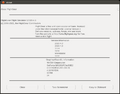
about.xml PUI/XML dialog parsed/rendered via the Canvas GUI and the underlying XMLDialog.nas parser/translator (04-2023)
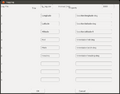
logging.xml PUI/XML dialog parsed/rendered via the Canvas GUI and the underlying XMLDialog.nas parser/translator (04-2023)
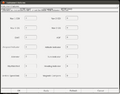
logging.xml PUI/XML dialog parsed/rendered via the Canvas GUI and the underlying XMLDialog.nas parser/translator (04-2023)
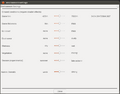
Screen shot showing the XMLDialog.nas bridge in use to parse/render the environment.xml PUI/XML dialog (unmodified)


Parser
|
|
The corresponding Nasal/Canvas module to dynamically "translate" legacy PUI/XML dialogs into Canvas dialogs (at runtime), is to be found in fgdata/Nasal/gui/XMLDialog.nas [10]
Widgets
|
|
It’s split between Simgear (see classes with widget / layout in the name) and in FGData. (Eg widgets/Button.nas). To be able to use the existing dialog XML files un-modified (which is a design goal), James is extending the widget types with many additional ones (eg PUI has slider, dial, combo-box, checkbox, all of which need to be created, see Canvas widget matrix.
Thomas’s canvas widgets have a very good separation of API + state from appearance, so all styling is in its own file, and James is being very strict about maintaining this separation, so we also retain the re-styling feature of the PUI UI, which many people also rely on. This does make the process of adding new widgets more complex, however.
Layouting
The other thing is to preserve all the layouting: James has added a grid layout to Simgear, since that is supported by the existing PUI code (even though the layouts are not actually part of PUI itself). The problem is getting the sizing / hinting of all the widgets to match the PUI values, so that dialogs look approximately the same under the new UI as they did with PUI; again this a design goal so that all existing dialogs in aircraft and add-ons, which we can’t update, continue to work and be usable. Debugging that is also proving quite tricky, since there’s all kinds of hard-coded assumptions built into PUI widgets about pixels, font-sizes etc which are not true in the new system.[11]
Background
In FlightGear, PUI dialogs are standard PropertyList XML Files that are stored in $FG_ROOT/gui/dialogs, they can contain the widgets mentioned in $FG_ROOT/Docs/README.gui, using a simple layout engine discussed in $FG_ROOT/Docs/README.layout, and bindings using a combination of so called fgcommands operating on properties (see $FG_ROOT/Docs/README.commands) and custom Nasal (FlightGear scripting) code.
In addition, each PUI/XML dialog may contain Nasal script sections that are executed when opening/closing the dialog, a feature which is commonly used for procedurally creating/updating widgets using the cmdarg() API, which allows the dialog tree to be traversed and manipulated prior to the dialog being rendered.
Widgets can be conditionally hidden/shown using a wrapper for SGCondition in props.nas
The canvas widget also supports its own embedded Nasal code section to execute arbitrary widget specific Nasal code upon opening/closing the dialog/widget.
PUI/XML dialogs can be loaded, dynamically created, updated and closed using a handful of fgcommands:
dialog-newdialog-showdialog-updatedialog-applydialog-close
PUI related OpenGL code is particularly infamous for causing rendering artifacts for people on AMD/ATI and Intel hardware (especially in combination with certain fonts/styles and effects/shaders), see ticket #2213.
PUI is also known to affect rendering performance quite significantly (see forum search for anthrax+gui FlightGear Forum), while also preventing FlightGear from using a more recent version of OpenGL[12][13].
However, improving the frame-rate and modernised 3D rendering, can’t be worked on until the PUI code, 2D panels and Shiva are removed, but doing so is a frustrating slow path[14]
Besides, while most people seem to agree PUI needs to be replaced, it sounds as if the fallout from doing so would be more painful (cumulatively) than the pain its existence causes.[15]
But given that with many graphics drivers PUI doesn't render correctly when higher shader quality is on, graphics folks are also convinced it needs to be replaced.[16]
In addition, OpenSceneGraph (OSG) can obviously not help optimize any PUI related GL code and PUI widgets are generally considered to be pretty archaic and not easy to extend[17][18][19].
| Note We use the GUI code from PLIB, which doesn't know anything about OSG. See the SGPuDrawable class in $FG_SRC/Viewer/renderer.cxx for the implementation. The one catch is that OSG has a strong notion of separation between the update of a "scene" and its rendering, and that might not play well with arbitrary existing OpenGL code. |
There is also activity towards providing alternatives to a PUI-based UI:
- Integrated Web GUI (external, browser-based - fully asynchronous)
- Howto:Processing legacy PUI dialogs using Canvas (internal, using the Canvas system and a simple Nasal parser to deal with existing PUI/XML dialogs)
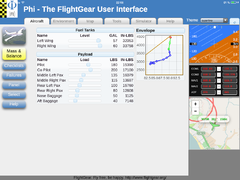
Screenshot showing Phi
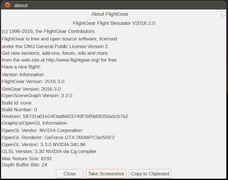
Screenshot showing a dialog rendered by the pui2canvas parser

