FlightGear Qt launcher
 The summary page of the Qt launcher for FlightGear 2024.1 as rendered on Windows 10 | |
| Started in | 01/2015 |
|---|---|
| Description | Integrated launcher for FlightGear |
| Maintainer(s) | James Turner |
| Contributor(s) | James Turner |
| Status | Under active development |
| Folders | [GitLab]/flightgear/flightgear/next/src/GUI |
| Changelog | [GitLab]/flightgear/flightgear/next/src/GUI |
| Package management |
|---|
|
Background |
|
Implementation |
|
Front Ends
|
The Qt launcher is an integrated launcher for FlightGear, replacing FGRun in the official distributions. Initially designed as a stop-gap solution in FlightGear 3.4 for the problem of support for the old FlightGear Mac launcher ending with OS X Yosemite, it has become FlightGear's main launcher for all platforms, and is shipped with all official FlightGear releases.
Usage
To run the launcher:
- Microsoft Windows: double-click the FlightGear <version> icon on the Desktop or click on Start > All Programs > FlightGear <version> > FlightGear Launcher.
- OS X and Linux: open a terminal and run fgfs with the option
--launcher:$ fgfs --launcher
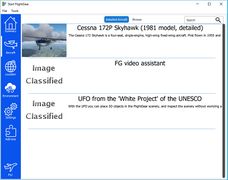
Aircraft page
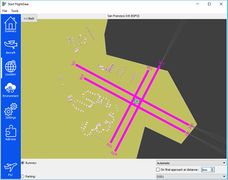
Location page
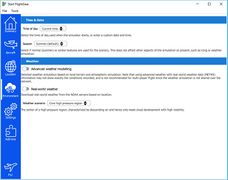
Environment page
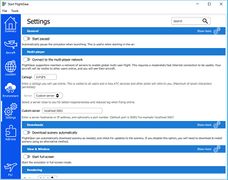
Settings page
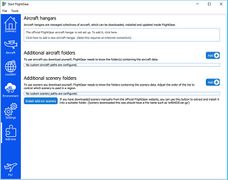
Addons page


Location selection
You can select an airport or an aircraft carrier from the "Location" tab. Alternatively, you can enter the latitude and longitude directly in the search box (e.g., 53.4, -3.4 or 18.4S, 87.23W; comma-separated) to start at any location.
You can also set an altitude to start in the air.
Data and aircraft/TerraSync download directories
The fgdata and download directories can be specified by clicking "··· > Select data files location...". The three dots button (···) is in the top left corner.
Preferences
The preferences are stored in $FG_HOME/FlightGear/FlightGear_20xx.x.ini on Unix-like systems and for Windows in %UserProfile%/AppData/Roaming/flightgear.org/FlightGear/FlightGear_20xx.x.ini.
Preferences can be reset to their default values by clicking "··· > Restore default settings...".
Background
James Turner (primarily) is working on developing a built-in launcher which is intended to completely replace fgrun. This new launcher is pretty mature, runs nicely on every supported OS, and is already available in the current release. Fred B. (who was the primary developer for fgrun hasn't been involved with FlightGear for quite some time, and fgrun is built on a pretty old gui library called "fltk". Any changes that have been made to fgrun in the past couple years have been band-aids by people just trying to keep it limping along with modern os updates, newer compilers, newer osg libraries, etc. There will come a time (probably fairly soon) where we will stop supporting, compiling and distributing fgrun with FlightGear. (Fgrun of course will always exist and anyone can compile it and use it and maintain it if they wish, it just will stop being distributed with the core FlightGear package in favor of the newer launcher.)[1]
In addition, this was also motivated by the plethora of 3rd party GUI launchers/frontends developed by numerous contributors over the years.
As for why the change, because the old one was Windows-only - the Qt5 thing works for Mac and Linux as well and allows to do things OS-independently, which is really conceptually superior as we don't need to deal with dedicated Win, Mac and Linux issues.[2]
History
In October 2014, Apple released OS X 10.10 Yosemite. Unfortunately, one of the frameworks the old FlightGear Mac launcher relied upon, called RubyCocoa  , was removed, making it incompatible with OS X Yosemite. James Turner started work on a solution for the then-upcoming 3.4 release. He added a simple built-in launcher using Qt, run before the main window would be created. It was released with FlightGear 3.4 as a Mac-only feature.
After FlightGear 3.4, it was decided to that this temporary Mac-only launcher would be developed into a replacement for FGRun and that it would become part of the plan for updating the FlightGear user interface. In FlightGear 3.6, it became available for all platforms, and has continued to be developed, enhanced, and refined.
As of May 2016, the Qt launcher is under active development. This includes the adding of new features, fixing bugs, and refining existing features.
As of mid 2016, the Qt UI is now also available at runtime; however, this needs a lot of testing, but aircraft can be installed / changed and location adjusted from within the sim. After some number of times the sim will crash.[3]
The Options which don't work are things like setting scenery / aircraft paths, and initial position, because those interfere with the values the launcher is passing itself.[4]
As of version 2016.4, FGRun has been removed from the official distributions.
Community video walkthroughs
Aircraft tab: Installing, filtering by ratings
References
|